

Search for answers or browse our knowledge base.
How can I configure Alert Delivery via SMS text?
Alerts via SMS using SMPP Protocol:
SMS text messages routing between applications and SMPP gateways can be done using SMPP (Short Message Peer-to-Peer) protocol. Web ViewPoint Enterprise supports below methods:
- SMS via SMS Server: Performs the SMPP client server method using TCP/IP protocol.
- SMS via API: Performs the SMPP protocol using REST APIs.
-
1. Go to OSS space, create a directory named wvpesmsv in the following location /usr/tandem.
Commands:
cd /usr/tandem
mkdir wvpesmsv
Example: /usr/tandem/wvpesmsv
2. Transfer the sms.tar file to the newly created directory and run the below command to extract the contents.
tar -xvf sms.tar
/usr/tandem/wvpesmsv: tar -xvf sms.tar
x lib/jsmpp-2.3.9.jar, 387029 bytes, 756 tape blocks
x lib/log4j-1.2-api-2.13.1.jar, 201684 bytes, 394 tape blocks
x lib/slf4j-api-1.7.30.jar, 41472 bytes, 81 tape blocks
x lib/slf4j-simple-1.7.30.jar, 15239 bytes, 30 tape blocks
x sms.tar, 1352704 bytes, 2642 tape blocks
x wvpe-sms.jar, 699825 bytes, 1367 tape blocks
x wvpe-sms.sh, 470 bytes, 1 tape blocks
x wvpeSMSStart.sh, 501 bytes, 1 tape blocks
x wvpe_sms_configuration.properties, 171 bytes, 1 tape blocks
3. Depending on which protocol the user chooses to use (i.e., SMS via SMS server or via API) the wvpe_sms_configuration.properties.sh file needs to be changed.
-
- For SMS via SMS Server
Edit wvpe_sms_configuration.properties.sh file and update the below options as needed:
sms_sender_type=smsc
smsc_ipaddress=10.20.30.40
smsc_port=8686
system_id=SYSID
password=password
system_type=MHS
number_type=1
numbering_plan_indicator=1
sender_phone_number=1234567890
-
- For SMS via API
For SMS via API, the wvpe_sms_configuration.properties.sh file needs to be changed with the below contents:
sms_sender_type=https
https_path=https://domain.name/b2c/mtk/SmSend?CharsetURL=UTF-
username=username
password=password
4. Edit wvpeSMSStart.sh. Change blue box to current path. Check all other paths exist or updated them.

Give execute permission to the script file using the below command:
chmod 755 ./wvpeSMSStart.sh
5. If the TCP Process is different from $ZTC0, define the specific process name (add_define =tcpip^process^name file=\$NAME) in the umpSysLogStart.sh file.
#!/bin/sh
cd /usr/tandem/wvpesmsv
export _RLD_LIB_PATH=$_RLD_LIB_PATH:/usr/tandem/javaexth11/lib
export JAVA_HOME=/usr/tandem/nssjava/jdk180_l80/
export JREHOME=$JAVA_HOME/jre
export PATH=/usr/tandem/javaexth11/bin:$PATH
export DEBUG_PROG=’run -name=/G/usdp’
add_define =tcpip^process^name file=\$NAME
run -name=/G/usdp /usr/tandem/nssjava/jdk180_l80/bin/java -cp lib/jsmpp-2.3.9.jar:lib/log4j-1.2-api-2.15.0.jar:lib/slf4j-api-1.7.30.jar:lib/slf4j-simple-1.7.30.jar:/usr/tandem/javaexth11/lib/tdmext.jar:wvpe-sms.jar com.idelji.wvpe.sms.SendSMS
6. On guardian, add the persistent process information via SCF. To do so, go to SCF prompt, modify the required fields as mentioned below and run the lines (as shown below):
a. Change the CPU value if necessary.
b. Change the DEAFULTVOL location. This is the default volume of the user who is logged on to NonStop.
c. Make sure the OSS path /usr/tandem/wvpesmsv/wvpeSMSStart.sh is the same one you created in Step 1.
ADD PROCESS $ZZKRN.USDP , &
AUTORESTART 2 , &
CPU 03 , &
DEFAULTVOL $IDEL00.QABKCOL , &
HIGHPIN ON , &
HOMETERM $ZHOME , &
INFILE $ZHOME , &
NAME $USDP0 , &
ASSOCPROC $USDP , &
OUTFILE $ZHOME , &
PRIORITY 146 , &
PROGRAM $SYSTEM.SYSTEM.OSH , &
SAVEABEND OFF , &
STARTMODE MANUAL , &
STARTUPMSG “-osstty -p /usr/tandem/wvpesmsv/wvpeSMSStart.sh <- >>/tmp/wvpeSMSLog.out 2>>/tmp/wvpeSMSLog.err” , &
STOPMODE STANDARD , &
TYPE OTHER, &
USERID SUPER.SUPER
7. To start the process (in SCF): START PROCESS $ZZKRN.USDP
8. Verify that the process is running by running the below command in SCF.
-> Status PROCESS $ZZKRN.USDP
NONSTOP KERNEL – Status PROCESS NSCLOUD.$ZZKRN.#USDP
Symbolic Name Name State Sub Primary PID Backup PID Owner
USDP $USDP0 STARTED 3 ,655 None 255,255
USDP $USDP STARTED 3 ,830 None 255,255
9. To stop the process (in SCF): ABORT PROCESS $ZZKRN.USDP
10. Output will be written to the tmp/wvpeSMSLog.out.
cat /tmp/wvpeSMSLog.out
New code 20000 4204
Configuration: smsSenderType=smsc,smscIPAddress=10.20.30.40,smsPort=8686,syst
emId=SYSID,password=password,systemType=MHS,numberType=1,numberingPlanIndicat
or=1,senderPhoneNumber=1234567890.
Receiver Phone Number: 1234567890 Message: WVP Enterprise Alert Server: \RADV
Date: 2021-Dec-13 Time: 21:44:46 Severity: Minor Alert Type: Notification Metric: %% Busy Object: 01 Expected: less than 1% Actual: 16% Addl Info: test for phone server
Alerts via SMTP with TLS 1.2
WVP E now offers compatibility with SMTP TLS 1.2. To configure alerts via SMTP using TLS 1.2, do the following:
- Logon to My Nonstop, navigate to Manage section click on Edit button for Web ViewPoint Enterprise installed instance. Next, navigate to Configure Params section and search for PARAM SMTP-VIA-OSS. You’ll be provided with 2 options- Select YES to enable.
- Update the PARAM SMTPOSS-PROCESS to the process name configured. Note that this param needs to be added only if you change the default SMTP process from $USTB to a different process name.
- Follow the steps to configure SMTP persistent process on OSS.
- Follow the steps to configure the Trap receiver settings and add alerts.
Configure SMTP persistent process on OSS:
1. Go to OSS space, create a directory named wvpesmtp in the following location /usr/tandem.
Commands:
cd /usr/tandem
mkdir wvpesmtp
Example: /usr/tandem/wvpesmtp
2. Transfer the smtp.tar file to the newly created directory and run the below command to extract the contents.
tar -xvf smtp.tar
/usr/tandem/wvpesmtp: tar -xvf smtp.tar
/usr/tandem/qawvp/smtpb: ls -al
total 3340
drwxrwxrwx 1 IDELQA.MGR IDELQA 4096 Jan 16 14:44 .
drwxrwxrwx 1 IQA.RIYA IQA 4096 Feb 15 14:17 ..
drwxrwxrwx 1 IDELQA.MGR IDELQA 4096 Jan 8 10:14 lib
-rw-r–r– 1 IDELQA.MGR IDELQA 952320 Jan 16 14:44 smtp.tar
-rw-rw-rw- 1 IDELQA.MGR IDELQA 744177 Jan 16 14:35 wvpe-smtp.jar
-rwxr-xr-x 1 IDELQA.MGR IDELQA 374 Dec 5 14:25 wvpeSMTPStart.sh
-rw-rw-rw- 1 IDELQA.MGR IDELQA 53 Dec 5 14:24 wvpe_smtp_configuration.properties
-rw-rw-rw- 1 IDELQA.MGR IDELQA 545 Dec 5 14:24 wvpe_smtp_scf.txt
3. Edit wvpeSMTPStart.sh.
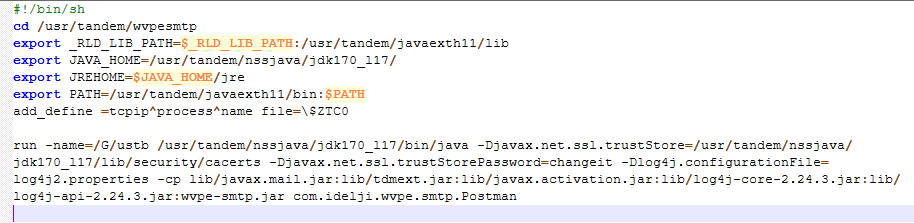
cd /usr/tandem/wvpesmtp
Make sure the above path directs to the directory that contains all the smtp files.
run -name=/G/ustb /usr/tandem/nssjava/jdk170_l17/bin/java -Djavax.net.ssl.trustStore=/usr/tandem/nssjava/jdk170_l17/lib/security/cacerts -Djavax.net.ssl.trustStorePassword=changeit -Dlog4j.configurationFile=log4j2.properties -cp lib/javax.mail.jar:lib/tdmext.jar:lib/javax.activation.jar:lib/log4j-core-2.24.3.jar:lib/log4j-api-2.24.3.jar:wvpe-smtp.jar com.idelji.wvpe.smtp.Postman
Make sure the process name ‘/G/ustb’ is the same as the PARAM SMTPOSS-PROCESS configured in My Nonstop. Edit the process name to a unique value if needed.
Give execute permission to the script file using the below command:
chmod 755 ./wvpeSMTPStart.sh
Configure SMTP persistent process on Guardian:
On guardian, add the persistent process information via SCF. To do so, go to SCF prompt, modify the required fields as mentioned below and run the lines (as shown below):
a. Change the CPU value if necessary.
b. Change the DEAFULTVOL location. This is the default volume of the user who is logged on to Nonstop.
c. Make sure the OSS path /usr/tandem/wvpesmtp/wvpeSMTPStart.sh. is the same one you created in wvpeSMTPStart.sh and the ASSOCPROC name is the same as SMTPOSS-PROCESS PARAM configured in My Nonstop.
ADD PROCESS $ZZKRN.USTB , &
AUTORESTART 2 , &
CPU 03 , &
DEFAULTVOL $SYSTEM.IDELJI, &
HIGHPIN ON , &
HOMETERM $ZHOME , &
INFILE $ZHOME , &
NAME $USTB0 , &
ASSOCPROC $USTB , &
OUTFILE $ZHOME , &
PRIORITY 146 , &
PROGRAM $SYSTEM.SYSTEM.OSH , &
SAVEABEND OFF , &
STARTMODE MANUAL , &
STARTUPMSG “-osstty -p /usr/tandem/wvpesmtp/wvpeSMTPStart.sh <- >>/tmp/wvpeSMTPLog.out 2>>/tmp/wvpeSMTPLog.err” , &
STOPMODE STANDARD , &
TYPE OTHER, &
USERID SUPER.SUPER
d. To start the process (in SCF): START PROCESS $ZZKRN.USTB
e. Verify that the process is running by running the below command in SCF.
-> Status PROCESS $ZZKRN.USTB
NONSTOP KERNEL – Status PROCESS NSCLOUD.$ZZKRN.#USTP
Symbolic Name Name State Sub Primary PID Backup PID Owner
USTP $USTB0 STARTED 3 ,655 None 255,255
USTP $USTB STARTED 3 ,830 None 255,255
f. To stop the process (in SCF): ABORT PROCESS $ZZKRN.USTB
g. Output will be written to the tmp/wvpeSMTPLog.out.